private void SendEmailToUnresolvedRecent(IOrganizationService prmCrmService, string
             prmToRecipientEmailAddress, Guid prmSenderUserId, string prmSubject, string prmMessageBody)
        {

            // Email record id
            Guid wod_EmailId = Guid.Empty;

            // Creating Email 'to' recipient activity party entity object
            Entity wod_EmailToReciepent = new Entity("activityparty");

            // Creating Email 'from' recipient activity party entity object
            Entity wod_EmailFromReciepent = new Entity("activityparty");

            // Assigning receiver email address to activity party addressused attribute
            //wod_EmailToReciepent["participationtypemask"] = new OptionSetValue(0);
            wod_EmailToReciepent["addressused"] = prmToRecipientEmailAddress;

            // Setting from user account
            wod_EmailFromReciepent["partyid"] = new EntityReference("systemuser", prmSenderUserId);

            // Creating Email entity object
            Entity wod_EmailEntity = new Entity("email");

            // Setting email entity 'to' attribute value
            wod_EmailEntity["to"] = new Entity[] { wod_EmailToReciepent };

            // Setting email entity 'from' attribute value
            wod_EmailEntity["from"] = new Entity[] { wod_EmailFromReciepent };

            // Setting email subject and description
            wod_EmailEntity["subject"] = prmSubject;

            wod_EmailEntity["description"] = prmMessageBody;

            // Creating email record
            wod_EmailId = prmCrmService.Create(wod_EmailEntity);

            // Creating SendEmailRequest object for sending email
            SendEmailRequest wod_SendEmailRequest = new SendEmailRequest();

            // Creating Email tracking token request object
            GetTrackingTokenEmailRequest wod_GetTrackingTokenEmailRequest = new GetTrackingTokenEmailRequest();

            // Creating Email tracking token response object to get tracking token value
            GetTrackingTokenEmailResponse wod_GetTrackingTokenEmailResponse = null;

            // Setting email record if for sending email
            wod_SendEmailRequest.EmailId = wod_EmailId;

            wod_SendEmailRequest.IssueSend = true;

            // Getting tracking token value
            wod_GetTrackingTokenEmailResponse = (GetTrackingTokenEmailResponse)
                                                 prmCrmService.Execute (wod_GetTrackingTokenEmailRequest);

            // Setting tracking token value
            wod_SendEmailRequest.TrackingToken = wod_GetTrackingTokenEmailResponse.TrackingToken;

            // Sending email
            prmCrmService.Execute(wod_SendEmailRequest);

        }

My LogiX is Undeniable.
Showing posts with label CRM 2011. Show all posts
Showing posts with label CRM 2011. Show all posts
C# Code for Sending Email to Unresolved Recipients
This code will send email to unresolved recipient.


Follow a lead from creation through closure
A lead record in Microsoft Dynamics CRM Online represents a potential customer who must be qualified or disqualified as a sales opportunity. You can use leads to manage potential sales from the point at which you become aware of a customer's interest through the successful sale.
The following diagram illustrates the ways that you can create a lead and convert it to several different record types.

There are several ways that you can create a lead in Microsoft Dynamics CRM Online:
- Create the lead manually.
- Convert a campaign response into a lead. For more information, see Follow a campaign response through the marketing process.
- Import leads into CRM from an external file.
After you create the lead, you can convert it into any of the following three record types:
- Account
- Contact
- Opportunity
When you convert the lead to an opportunity, you can also choose to link the new opportunity to the new accounts or contacts you may have created, or to an existing account or contact in your Microsoft Dynamics CRM Online database.
Follow an opportunity from creation through closure
An opportunity is a potential sale or possible revenue from an account or contact.
The following diagram illustrates the ways that you can create an opportunity and close it when the potential customer decides whether to move forward with the sale.

There are several ways that you can create an opportunity in Microsoft Dynamics CRM:
- Create the opportunity manually.
- Convert a lead into an opportunity. For more information, see Follow a lead from creation through closure.
- Import opportunities into Microsoft Dynamics CRM from an external file.
When you know whether or not the customer is going to move forward with the sale, you can close the opportunity with a status of either Won or Lost.
CRM 2011 Processes
Processes - Introduction
Processes - Dialogs
Processes - Workflow
Processes - Performance & Versioning
CRM 2011 UX Extensibility
UX Extensibility - Intro
UX Extensibility - WebResources
UX Extensibility - Client Scripting
UX Extensibility - Filtered Lookups
CRM 2011 Solutions
Solutions - Data Modeling
Solutions - Introduction
Solutions - Managed & UnManaged
Solutions - Publishing
Execute workflow using button
//Execute workflow on button click
var obttcode = "10032";
var wrkflo_id = "{154599DD-B20B-4F72-8771-CA93C660C820}";
launchOnDemandWorkflowForm(' ',obttcode,wrkflo_id); //Crm Defined function
alert("executed");
Debug Plugins using Profiler
One can debug CRM plug ins without connecting to CRM server or without remote debugging.
Here are the steps as in how you can use Profiler for debugging plug ins:
1> Connect to CRM using plugin registration tool of March SDK 2012.
2> Click on Install Profiler

3> You will find a new node attached to registered plugins “Plugin Profiler”.

4> Select a plug-in step and click Profile to enable profiling.

5> Then start your plugin from MSCRM i.e if your plugin is on update perform update operation and download the error file.
6> Then in Visual Studio attach to process “plugin registeration.exe”. Add the breakpoint from where you would like to debug.

7> Then click on Debug in plugin registration tool.

8> In Profile location provide the path of the error log of the plugin.
9> In Assembly location provide the dll of the plugin from which you got error.
10> Then select the Plugin class from Plug-in. This drop down will contains all classes present in the dll.
11> To start debugging just click on Start Plug-in Execution.

parsing Xml Response
// Save all entity nodes in an array. Each result is returned in a BusinessEntity node.
// All BusinessEntity nodes are contained in a single BusinessEntities node.
// The BusinessEntities node in contained in a RetrieveMultipleResult node
// You could also use the XPath //BusinessEntities/BusinessEntity or //BusinessEntity
// "//" tells the XML parser to find all occurrences in the document starting with the
// supplied path, so it would find a/b/c/BusinessEntity as well as x/BusinessEntity.
var entityNodes = resultXml.selectNodes("//RetrieveMultipleResult/BusinessEntities/BusinessEntity");

// Loop through the collection of returned entities.
// Note that the query above limits the result to a single entity, so you will only find one
// node. To be more specific, it could be 0 nodes as well, if you don't have access to accounts
// or your system is empty.
for (var i = 0; i < entityNodes.length; i++) {

// Access the current array element
var entityNode = entityNodes[i];

// Attributes are child nodes of the BusinessEntity node. Use selectSingleNode to return
// the first occurrence of a named node. The selectNodes method we used before returns all
// matching nodes, but as an attribute name only occurs once, selectSingleNode is easier to use.
// Use the same namespace alias (q1) you have specified in the query.
var accountidNode = entityNode.selectSingleNode("q1:accountid");
var nameNode = entityNode.selectSingleNode("q1:name");

// Always check for null values. If an attribute is set to null, it is not contained in the
// resulting XML. And accessing accountidNode.text when accountidNode is null leads to
// a runtime error.
var accountid = (accountidNode == null) ? null : accountidNode.text;
var name = (nameNode == null) ? null : nameNode.text;

// finally display the values.
alert(name + ", " + accountid);
}
Migration and Upgrade Microsoft Dynamics CRM 4.0 to 2011
| Solution Management | The concept is quite powerful as it allows components to be layered on to the base system but also on top of other solutions (i.e. when there are inter-dependencies). It also provides a way to protect the intellectual property of the components in your solution and includes change management and versioning. | ||||
| Plug-In Transaction Support | In CRM 4.0 you could register a plug-in to run either before (pre-event) or after (post-event) the CRM platform operation. However, you were not able to run as part of the transaction itself, so you had to write your own compensation logic in the event the CRM platform operation failed. CRM 5.0 addresses this limitation, and you can now choose to register you plug-in as part of the platform operation. The CRM 5.0 plug-in registration tool has been modified to support this. | ||||
| Automatic Plug-In Profiling | CRM 5.0 will keep track of how a plug-in is executing, what resources it consumes, if it is causing unexpected exceptions and whether or not it is violating security constraints. If a particular plug-in fails a number of times it is automatically disabled from executing, helping to maintain system integrity. | ||||
| ADO.Net Data Services and .Net RIA services support | Enables an easier data access for web applications, AJAX and Silverlight | ||||
| Workflow Up gradation |
| ||||
| Claims based Authentication and Federation | CRM 5.0 will enable us to integrate transparently authentication with other applications either On-Premise or on the Cloud. | ||||
| Unstructured Relationships | CRM 5.0 allows you to define ad-hoc relationships between any two entities. | ||||
| Team Ownership | Entities in CRM 4.0 were either User Owned or Organization Owned. Now Team Owned entities are added in CRM5, and integrated into the role-based security model. | ||||
| Native SharePoint Integration | Integration with Windows SharePoint Services for document management, which includes site and document library provisioning, document metadata, item security, and check-in/check-out capabilities. | ||||
| Others |
|
Introduction to Microsoft Dynamics CRM 2011 Plugins
| Introduction | ||||||||||||||||||||||||
| Whenever we need to extend the OOB functionality of Microsoft Dynamics CRM 2011. We can write custom plugins which can run before an event performs it operations and after an event completes its operations. It can be executed synchronously or asynchronously from managed queue. With the help, can perform data validations; integrate with other legacy applications, auto number generations and writing complex business logic. We can write custom plugin in Microsoft .net 4.0 framework writing code in Microsoft C# or VB .net. | ||||||||||||||||||||||||
| We can register the Plugin or custom workflow activity using Plugin Registration tool. It can be registered in online and offline mode [Microsoft Dynamics CRM for Outlook with offline access client]. However, registering custom workflow activities with Microsoft Dynamics CRM Online is not supported using the registration tool. | ||||||||||||||||||||||||
| The Plug-in Registration tool is provided as a source code sample in the Tools folder of the Microsoft Dynamics CRM SDK download. Review the instructions provided in the Tools/Plugin Registration/Readme.docx file for more information about the tool and instructions on how to build the tool. | ||||||||||||||||||||||||
| Framework | ||||||||||||||||||||||||
| The Microsoft Dynamics CRM 2011 event processing subsystem executes plug-ins based on a message pipeline execution model. A user action or an SDK method call or other application results in a message being sent to the organization Web service contains business entity and core operation information. The message is passed through the event execution pipeline where it can be read or modified by the platform core operation and any registered plug-ins. | ||||||||||||||||||||||||
| The below figure depicts the overall architecture of the Microsoft Dynamics CRM 2011 platform with respect to both synchronous and asynchronous event processing: | ||||||||||||||||||||||||
|
| ||||||||||||||||||||||||
| The plugins registered synchronously will be executed immediately whereas plugins registered asynchronous will be queued with asynchronous service and executed later. The event pipeline is divided into 5 stages are as follows: | ||||||||||||||||||||||||
| ||||||||||||||||||||||||
| The Microsoft Dynamics CRM 2011 execution pipeline is organization specific. Server can host multiple organizations. There will be virtual pipeline for every organization. This means a plugin must be registered with each organization execution where it has to execute. We can register plugin in sandbox or outside sandbox. The difference if plugin registered within sandbox [known as partial trust] it will not have access to external endpoints other case if plugin registered outside the sandbox [known as full trust] it will support on-premise and Internet facing deployments. Whereas for online deployment plugin must be registered in sandbox only. |

CRM 4,2011:Autonumber using Workflow
This will work in CRM 4 and CRM 2011, although, for convenience, I’m doing it in the 2011 beta.
Current Auto-Numbering Options
The first option is for a limited set of entities which have auto-numbering out of the box.
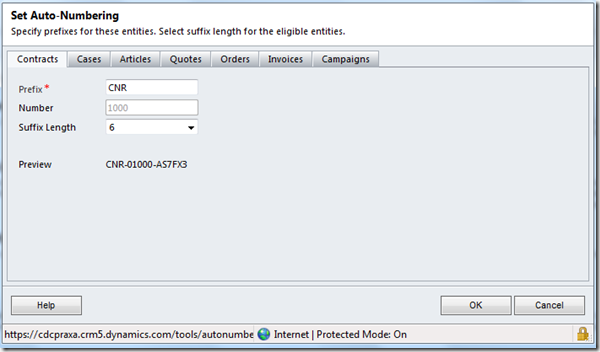
For Contracts, Cases, Articles, Quotes, Orders, Invoices and Campaigns, auto-numbering can be set in the Administrative settings in CRM. The prefix for each of the entity numbers can be set and the final suffix can be of a length from four characters to six characters. A word of warning, if you change the length of the prefix, this changes for ALL the entities, not just the one you’re on.
For other entities, if you are using CRM 4, there is also an auto-numbering plugin available from codeplex.
http://crmnumbering.codeplex.com/
Of course, if you are using the online version of CRM 4 or CRM 2011, you will need to resort to another option. Here is one using workflow.
Step One: An Entity to Store the Current Incrementing Value
To store the current value of the incrementing value, we need a new entity. For this entity we create one record to hold the values.

In this case I’m storing the prefix and the suffix I am going to use for an incrementing value on the account record.
The record also needs to have 1:N relationship to the records it will increment. In this case, the Account entity.
Step Two: Set up the Field on the ‘Numbered’ Record
Account already has an ‘Account Number’ field so I will use this field to hold the value of the field.
Step Three: Set up the Workflows
I tried doing this with one workflow but for some reason the workflow could not link to the record with the values in it and then populate them. Therefore, I’m using two. The first workflow runs on the creation of the Account record and links to the record storing the increment values.
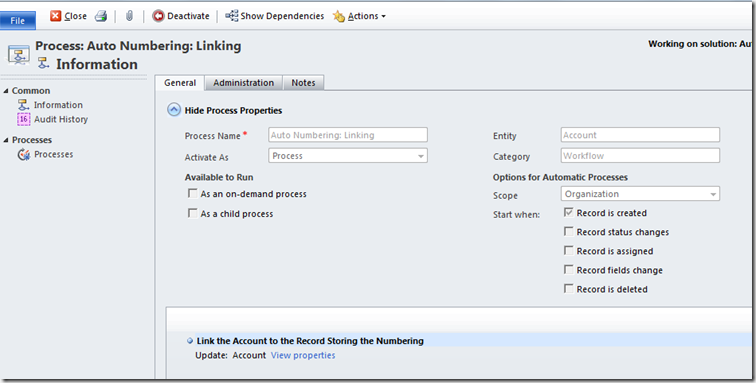
Incidentally, there is no need to add the lookup to the Account form as workflows can populate fields whether or not they have been added to the form. This is great when you need to store values but do not want to clutter the forms up.
The second one is triggered when the link to the value store record is populated. It does the populating of the Account record and also increments the value store by one so the next Account record gets a different suffix value.

For the Account Number, we add the two ‘slugs’ divided by a dash.

For the incrementing of the storing record, I use a little known trick which is available in both versions of CRM.

When you use the Form Assistant to populate a field, drop the ‘Set To’ Operator down and you will see a whole range of different operators available, depending on the field type. In the case of integer fields, one of the options is ‘Increment By’. By adding ‘1’ to the Default Value and hitting OK we tell the workflow to increment by 1 every time the workflow fires.
What We End Up With
After all this we end up with a process which will populate the Account Number of an Account with a unique value every time an Account record is created. As usual with workflows, this runs asynchronously. In other words, you will NOT see the field populating on the initial creation but rather only after you have saved and closed the record and reopened it a little time later, after the workflows have finished.

We can extend this to multiple entities by adding other fields to the store record and setting up additional 1:N relationships from the store record entity.


RTF to HTML Convertor
/ Very primitive RTF 2 HTML reader
// Converts tiny subset of RTF (from VS IDE) into html.
// Author: Mike Stall (http://blogs.msdn.com/jmstall)
// Gets input RTF from clipboard.
using System;
using System.Collections.Generic;
using System.Text;
using System.Windows.Forms;
using System.Text.RegularExpressions;
using System.IO;

namespace ClipBoard1
{
    class Program
    {
        [STAThread()]
        static void Main(string[] args)
        {
            Console.WriteLine("Get RTF from the clipboard.");
            IDataObject iData = Clipboard.GetDataObject();
            string[] f = iData.GetFormats();
            string rtf = (string)iData.GetData(DataFormats.Rtf);

            Console.WriteLine(iData.GetData(DataFormats.Text));

            // We assume the colortable and fontable are a standard preset used by VS.
            // Avoids hassle of parsing them.
            // Skip past {\colortbl.*;} and to the start of the real data
            // @todo - regular expression would be good here.
            int i1 = rtf.IndexOf(@"{\colortbl");
            if (i1 <= 0) throw new ArgumentException("Bad input RTF.");
            int i2 = rtf.IndexOf(";}", i1);
            if (i2 <= 0) throw new ArgumentException("Bad input RTF.");
            string data = rtf.Substring(i2 + 2, rtf.Length - (i2 + 2) - 1);

            TextWriter tw = new StreamWriter("out.html");
            Format(tw, data);
            tw.Close();
        }

        // Default color table used by VS's IDE.
        static string[] m_colorTable = new string[]
            {
               // rrGGbb
                "#000000", // default, starts at index 0
                "#000000", // real color table starts at index 1
                "#0000FF",
                "#00ffFF",
                "#00FF00",
                "#FF00FF",
                "#FF0000",
                "#FFFF00",
                "#FFffFF",
                "#000080",
                "#008080",
                "#008000",
                "#800080",
                "#800000",
                "#808000",
                "#808080",
                "#c0c0c0"
            };


        // Escape HTML chars
        static string Escape(string st)
        {
            st = st.Replace("&", "&");
            st = st.Replace("<", "<");
            st = st.Replace(">", ">");
            return st;
        }
        // Convert the RTF data into an HTML stream.
        // This rtf snippet is past the font + color tables, so we're just transfering control words now.
        // Write out HTML to the text writer.
        static void Format(TextWriter tw, string rtf)
        {
            tw.Write("");
            tw.Write("");
            // Example: \fs20 \cf2 using\cf0  System;
            // root --> ('text' '\' ('control word' | 'escaped char'))+
            // 'control word'  --> (alpha)+ (numeric*) space?
            // 'escaped char' = 'x'. Some characters \, {, } are escaped: '\x' --> 'x'
            // @todo - handle embedded groups (begin with '{')

            int idx = 0;
            while (idx < rtf.Length)
            {
                // Get any text up to a '\'.
                Regex r1 = new Regex(@"(.*?)\\", RegexOptions.Singleline | RegexOptions.IgnoreCase);
                Match m = r1.Match(rtf, idx);
                if (m.Length == 0) break;

                // text will be empty if we have adjacent control words
                string stText = m.Groups[1].ToString();
                tw.Write(Escape(stText));
                idx += m.Length;

                // check for RTF escape characters. According to the spec, these are the only escaped chars.
                char chNext = rtf[idx];
                if (chNext == '{' || chNext == '}' || chNext == '\\')
                {
                    // Escaped char
                    tw.Write(chNext);
                    idx++;
                    continue;
                }

                // Must be a control char. @todo- delimeter includes more than just space, right?
                Regex r2 = new Regex(@"([\{a-z]+)([0-9]*) ", RegexOptions.Singleline | RegexOptions.IgnoreCase);
                m = r2.Match(rtf, idx);
                string stCtrlWord = m.Groups[1].ToString();
                string stCtrlParam = m.Groups[2].ToString();

                if (stCtrlWord == "cf")
                {
                    // Set font color.
                    int iColor = Int32.Parse(stCtrlParam);
                    tw.Write(""); // close previous span, and start a new one for the given color.
                    tw.Write("");
                }
                else if (stCtrlWord == "fs")
                {
                    // Sets font size. ignore
                }
                else if (stCtrlWord == "par")
                {
                    // This is a newline. ignore
                    // @todo- I think the only reason we can ignore this is because the \par in our input are always followed by
                    // a '\r\n' and we're accidentally writing that.
                }
                else
                {
                    throw new ArgumentException("Unrecognized control word '" + stCtrlWord + stCtrlParam + "'after:" + stText);
                }
                idx += m.Length;
            }
            tw.Write(Escape(rtf.Substring(idx))); // rest of string

            tw.Write("
");
        } // end Format()
    }
}
Merge Two Records
using System;
using System.ServiceModel;
using Microsoft.Crm.Sdk.Messages;
using Microsoft.Xrm.Sdk;
using Microsoft.Xrm.Sdk.Client;
using Microsoft.Xrm.Sdk.Query;
namespace Microsoft.Crm.Sdk.Samples
{
///
/// This sample shows how to merge two entity records.
///
///
/// At run-time, you will be given the option to delete all the
/// database records created by this program.
///
public class Merge
{
#region Class Level Members
private OrganizationServiceProxy _serviceProxy;
private Guid _account1Id;
private Guid _account2Id;
#endregion
///
/// This method shows how to merge two entity records with the Merge message.
///
/// Contains server connection information.
/// When True, the user will be prompted to delete
/// all created entities.
public void Run(ServerConnection.Configuration serverConfig,
bool promptForDelete)
{
using (_serviceProxy = ServerConnection.GetOrganizationProxy(serverConfig))
{
// This statement is required to enable early-bound type support.
_serviceProxy.EnableProxyTypes();
//Create the Contact and Incident required for this sample.
CreateRequiredRecords();
// Create the target for the request.
EntityReference target = new EntityReference();
// Id is the GUID of the account that is being merged into.
// LogicalName is the type of the entity being merged to, as a string
target.Id = _account1Id;
target.LogicalName = Account.EntityLogicalName;
// Create the request.
MergeRequest merge = new MergeRequest();
// SubordinateId is the GUID of the account merging.
merge.SubordinateId = _account2Id;
merge.Target = target;
merge.PerformParentingChecks = false;
Console.WriteLine("\nMerging account2 into account1 and adding " +
"\"test\" as Address 1 Line 1");
// Create another account to hold new data to merge into the entity.
// If you use the subordinate account object, its data will be merged.
Account updateContent = new Account();
updateContent.Address1_Line1 = "test";
// Set the content you want updated on the merged account
merge.UpdateContent = updateContent;
// Execute the request.
MergeResponse merged = (MergeResponse)_serviceProxy.Execute(merge);
Account mergeeAccount =
(Account)_serviceProxy.Retrieve(Account.EntityLogicalName,
_account2Id, new ColumnSet(allColumns:true));
if(mergeeAccount.Merged == true)
{
Account mergedAccount =
(Account)_serviceProxy.Retrieve(Account.EntityLogicalName,
_account1Id, new ColumnSet(allColumns: true));
Console.WriteLine("\nAccounts merged successfully into account1");
Console.WriteLine(" Name: {0}", mergedAccount.Name);
Console.WriteLine(" Description: {0}", mergedAccount.Description);
Console.WriteLine(" Number of Employees: {0}",
mergedAccount.NumberOfEmployees);
Console.WriteLine(" Address 1 Line 1: {0}",
mergedAccount.Address1_Line1);
}
DeleteRequiredRecords(promptForDelete);
}
}
///
/// Creates any entity records that this sample requires.
///
public void CreateRequiredRecords()
{
// Create the first account, which will be merged into
Account account1 = new Account();
account1.Name = "Fourth Coffee";
account1.Description = "Coffee House";
_account1Id = _serviceProxy.Create(account1);
Console.WriteLine("Account 1 created with GUID {{{0}}}", _account1Id);
Console.WriteLine(" Name: {0}", account1.Name);
Console.WriteLine(" Description: {0}", account1.Description);
// Create the second account, which will be merged from
Account account2 = new Account();
account2.Name = "Fourth Coffee";
account2.NumberOfEmployees = 55;
_account2Id = _serviceProxy.Create(account2);
Console.WriteLine("Account 2 created with GUID {{{0}}}", _account2Id);
Console.WriteLine(" Name: {0}", account2.Name);
Console.WriteLine(" Number of Employees: {0}", account2.NumberOfEmployees);
}
///
/// Deletes any entity records that were created for this sample.
/// Indicates whether to prompt the user
/// to delete the records created in this sample.
///
public void DeleteRequiredRecords(bool prompt)
{
bool deleteRecords = true;
if (prompt)
{
Console.Write("\nDo you want these entity records deleted? (y/n) [y]: ");
String answer = Console.ReadLine();
Console.WriteLine();
deleteRecords = (answer.StartsWith("y") || answer.StartsWith("Y") ||
answer == String.Empty);
}
if (deleteRecords)
{
_serviceProxy.Delete(Account.EntityLogicalName, _account1Id);
_serviceProxy.Delete(Account.EntityLogicalName, _account2Id);
Console.WriteLine("Entity records have been deleted.");
}
}
#region Main method
///
/// Standard Main() method used by most SDK samples.
///
///
static public void Main(string[] args)
{
try
{
// Obtain the target organization's Web address and client logon
// credentials from the user.
ServerConnection serverConnect = new ServerConnection();
ServerConnection.Configuration config =
serverConnect.GetServerConfiguration();
var app = new Merge();
app.Run(config, true);
}
catch (FaultExceptionex)
{
Console.WriteLine("The application terminated with an error.");
Console.WriteLine("Timestamp: {0}", ex.Detail.Timestamp);
Console.WriteLine("Code: {0}", ex.Detail.ErrorCode);
Console.WriteLine("Message: {0}", ex.Detail.Message);
Console.WriteLine("Plugin Trace: {0}", ex.Detail.TraceText);
Console.WriteLine("Inner Fault: {0}",
null == ex.Detail.InnerFault ? "No Inner Fault" : "Has Inner Fault");
}
catch (System.TimeoutException ex)
{
Console.WriteLine("The application terminated with an error.");
Console.WriteLine("Message: {0}", ex.Message);
Console.WriteLine("Stack Trace: {0}", ex.StackTrace);
Console.WriteLine("Inner Fault: {0}",
null == ex.InnerException.Message ? "No Inner Fault" : ex.InnerException.Message);
}
catch (System.Exception ex)
{
Console.WriteLine("The application terminated with an error.");
Console.WriteLine(ex.Message);
// Display the details of the inner exception.
if (ex.InnerException != null)
{
Console.WriteLine(ex.InnerException.Message);
FaultExceptionfe =
ex.InnerException
as FaultException;
if (fe != null)
{
Console.WriteLine("Timestamp: {0}", fe.Detail.Timestamp);
Console.WriteLine("Code: {0}", fe.Detail.ErrorCode);
Console.WriteLine("Message: {0}", fe.Detail.Message);
Console.WriteLine("Plugin Trace: {0}", fe.Detail.TraceText);
Console.WriteLine("Inner Fault: {0}",
null == fe.Detail.InnerFault ? "No Inner Fault" : "Has Inner Fault");
}
}
}
// Additional exceptions to catch: SecurityTokenValidationException,
// ExpiredSecurityTokenException, SecurityAccessDeniedException,
// MessageSecurityException, and SecurityNegotiationException.
finally
{
Console.WriteLine("Pressto exit.");
Console.ReadLine();
}
}
#endregion Main method
}
}
Assign a Record to a Team
This sample shows how to assign a record to a team using the AssignRequest message.
using System;
using System.ServiceModel;
using System.ServiceModel.Description;
// These namespaces are found in the Microsoft.Xrm.Sdk.dll assembly
// found in the SDK\bin folder.
using Microsoft.Xrm.Sdk;
using Microsoft.Xrm.Sdk.Query;
using Microsoft.Xrm.Sdk.Discovery;
using Microsoft.Xrm.Sdk.Client;
using Microsoft.Crm.Sdk.Messages;
namespace Microsoft.Crm.Sdk.Samples
{
///
/// Demonstrates how to assign a record to a team.
/// If you want to run this sample repeatedly, you have the option to
/// delete all the records created at the end of execution.
///
public class AssignRecordToTeam
{
#region Class Level Members
///
/// Stores the organization service interface.
///
private OrganizationServiceProxy _serviceProxy;
private IOrganizationService _service;
// Define the IDs needed for this sample.
public Guid _accountId;
public Guid _teamId;
public Guid _roleId;
#endregion Class Level Members
#region How To Sample Code
///
/// Create and configure the organization service proxy.
/// Create a team, an account and a role.
/// Add read account privileges to the role.
/// Assign the role to the team so that they can read the account.
/// Assign the account to the team.
/// Optionally delete the account, team and role records.
///The friendly name of
/// the target organization.
///The name of the discovery server.
/// Indicates whether to prompt the user
/// to delete the records created in this sample.
///
public void Run(ServerConnection.Configuration serverConfig, bool promptForDelete)
{
try
{
// Connect to the Organization service.
// The using statement assures that the service proxy will be properly disposed.
using (_serviceProxy = ServerConnection.GetOrganizationProxy(serverConfig))
{
// This statement is required to enable early-bound type support.
_serviceProxy.EnableProxyTypes();
_service = (IOrganizationService)_serviceProxy;
// Call the method to create any data that this sample requires.
CreateRequiredRecords();
// Assign the account to a team.
AssignRequest assignRequest = new AssignRequest()
{
Assignee = new EntityReference
{
LogicalName = Team.EntityLogicalName,
Id = _teamId
},
Target = new EntityReference(Account.EntityLogicalName, _accountId)
};
_service.Execute(assignRequest);
Console.WriteLine("The account is owned by the team.");
DeleteRequiredRecords(promptForDelete);
}
}
// Catch any service fault exceptions that Microsoft Dynamics CRM throws.
catch (FaultException)
{
// You can handle an exception here or pass it back to the calling method.
throw;
}
}
///
/// This method creates any entity records that this sample requires.
/// Create a team, an account and a role.
/// Add read account privileges to the role.
/// Assign the role to the team so that they can read the account.
/// Assign the account to the team.
///
public void CreateRequiredRecords()
{
// Instantiate an account entity record and set its property values.
// See the Entity Metadata topic in the SDK documentation to determine
// which attributes must be set for each entity.
Account setupAccount = new Account
{
Name = "Example Account"
};
// Create the account record.
_accountId = _service.Create(setupAccount);
Console.WriteLine("Created {0}", setupAccount.Name);
// Retrieve the default business unit needed to create the team and role.
QueryExpression queryDefaultBusinessUnit = new QueryExpression
{
EntityName = BusinessUnit.EntityLogicalName,
ColumnSet = new ColumnSet("businessunitid" ),
Criteria = new FilterExpression()
};
queryDefaultBusinessUnit.Criteria.AddCondition("parentbusinessunitid",
ConditionOperator.Null);
BusinessUnit defaultBusinessUnit = (BusinessUnit)_service.RetrieveMultiple(
queryDefaultBusinessUnit).Entities[0];
// Instantiate a team entity record and set its property values.
// See the Entity Metadata topic in the SDK documentation to determine
// which attributes must be set for each entity.
Team setupTeam = new Team
{
Name = "Example Team",
BusinessUnitId = new EntityReference(BusinessUnit.EntityLogicalName,
defaultBusinessUnit.Id)
};
// Create a team record.
_teamId = _service.Create(setupTeam);
Console.WriteLine("Created {0}", setupTeam.Name);
// Instantiate a role entity record and set its property values.
// See the Entity Metadata topic in the SDK documentation to determine
// which attributes must be set for each entity.
Role setupRole = new Role
{
Name = "Example Role",
BusinessUnitId = new EntityReference(BusinessUnit.EntityLogicalName,
defaultBusinessUnit.Id)
};
// Create a role record. Typically you would use an existing role that has the
// the correct privileges. For this sample we need to be sure the role has
// at least the privilege to read account records.
_roleId = _service.Create(setupRole);
Console.WriteLine("Created {0}", setupRole.Name);
// Create a query expression to find the prvReadAccountPrivilege.
QueryExpression queryReadAccountPrivilege = new QueryExpression
{
EntityName = Privilege.EntityLogicalName,
ColumnSet = new ColumnSet("privilegeid", "name"),
Criteria = new FilterExpression()
};
queryReadAccountPrivilege.Criteria.AddCondition("name",
ConditionOperator.Equal, "prvReadAccount");
// Retrieve the prvReadAccount privilege.
Entity readAccountPrivilege = _service.RetrieveMultiple(
queryReadAccountPrivilege)[0];
Console.WriteLine("Retrieved {0}", readAccountPrivilege.Attributes["name"]);
// Add the prvReadAccount privilege to the example roles to assure the
// team can read accounts.
AddPrivilegesRoleRequest addPrivilegesRequest = new AddPrivilegesRoleRequest
{
RoleId = _roleId,
Privileges = new[]
{
// Grant prvReadAccount privilege.
new RolePrivilege
{
PrivilegeId = readAccountPrivilege.Id
}
}
};
_service.Execute(addPrivilegesRequest);
Console.WriteLine("Added privilege to role");
// Add the role to the team.
_service.Associate(
Team.EntityLogicalName,
_teamId,
new Relationship("teamroles_association"),
new EntityReferenceCollection() { new EntityReference(Role.EntityLogicalName, _roleId) });
Console.WriteLine("Assigned team to role");
// It takes some time for the privileges to propagate to the team. Delay the
// application until the privilege has been assigned.
bool teamLacksPrivilege = true;
while (teamLacksPrivilege)
{
RetrieveTeamPrivilegesRequest retrieveTeamPrivilegesRequest =
new RetrieveTeamPrivilegesRequest
{
TeamId = _teamId
};
RetrieveTeamPrivilegesResponse retrieveTeamPrivilegesResponse =
(RetrieveTeamPrivilegesResponse)_service.Execute(
retrieveTeamPrivilegesRequest);
foreach (RolePrivilege rp in
retrieveTeamPrivilegesResponse.RolePrivileges)
{
if (rp.PrivilegeId == readAccountPrivilege.Id)
{
teamLacksPrivilege = false;
break;
}
else
{
System.Threading.Thread.CurrentThread.Join(500);
}
}
}
return;
}
///
/// Deletes any entity records that were created for this sample.
/// Indicates whether to prompt the user
/// to delete the records created in this sample.
///
public void DeleteRequiredRecords(bool prompt)
{
bool deleteRecords = true;
if (prompt)
{
Console.WriteLine("\nDo you want these entity records deleted? (y/n)");
String answer = Console.ReadLine();
deleteRecords = (answer.StartsWith("y") || answer.StartsWith("Y"));
}
if (deleteRecords)
{
_service.Delete("account", _accountId);
_service.Delete("team", _teamId);
_service.Delete("role", _roleId);
Console.WriteLine("Entity records have been deleted.");
}
}
#endregion How To Sample Code
#region Main
///
/// Main. Runs the sample and provides error output.
/// Array of arguments to Main method.
///
static public void Main(string[] args)
{
try
{
// Obtain the target organization's Web address and client logon
// credentials from the user.
ServerConnection serverConnect = new ServerConnection();
ServerConnection.Configuration config = serverConnect.GetServerConfiguration();
AssignRecordToTeam app = new AssignRecordToTeam();
app.Run(config, true);
}
catch (FaultExceptionex)
{
Console.WriteLine("The application terminated with an error.");
Console.WriteLine("Timestamp: {0}", ex.Detail.Timestamp);
Console.WriteLine("Code: {0}", ex.Detail.ErrorCode);
Console.WriteLine("Message: {0}", ex.Detail.Message);
Console.WriteLine("Plugin Trace: {0}", ex.Detail.TraceText);
Console.WriteLine("Inner Fault: {0}",
null == ex.Detail.InnerFault ? "No Inner Fault" : "Has Inner Fault");
}
catch (System.TimeoutException ex)
{
Console.WriteLine("The application terminated with an error.");
Console.WriteLine("Message: {0}", ex.Message);
Console.WriteLine("Stack Trace: {0}", ex.StackTrace);
Console.WriteLine("Inner Fault: {0}",
null == ex.InnerException.Message ? "No Inner Fault" : ex.InnerException.Message);
}
catch (System.Exception ex)
{
Console.WriteLine("The application terminated with an error.");
Console.WriteLine(ex.Message);
// Display the details of the inner exception.
if (ex.InnerException != null)
{
Console.WriteLine(ex.InnerException.Message);
FaultExceptionfe =
ex.InnerException
as FaultException;
if (fe != null)
{
Console.WriteLine("Timestamp: {0}", fe.Detail.Timestamp);
Console.WriteLine("Code: {0}", fe.Detail.ErrorCode);
Console.WriteLine("Message: {0}", fe.Detail.Message);
Console.WriteLine("Plugin Trace: {0}", fe.Detail.TraceText);
Console.WriteLine("Inner Fault: {0}",
null == fe.Detail.InnerFault ? "No Inner Fault" : "Has Inner Fault");
}
}
}
finally
{
Console.WriteLine("Pressto exit.");
Console.ReadLine();
}
}
#endregion Main
}
}
Defaulting the History ‘Filter on’ to ‘All’ on Dynamics CRM 4.0 Accounts and Contacts
// History Default Filter to All
var crmloadarea = loadArea;
loadArea = function (area) {
    crmloadarea(area);
    if (area != "areaActivityHistory") { return; } // only hook into the history iframe

    var frame = document.getElementById(area + "Frame");
    frame.onreadystatechange = function () {
        if (frame.readyState == "complete") {
            doc = frame.contentWindow.document;
            doc.all.actualend[0].value = "All"; // instead of 30 days
            doc.all.actualend[0].FireOnChange();
        }
    }
}
Using CrmDiscoveryService
| Type | Value | Description |
| AD | 0 | Specifies Active Directory authentication. |
| Passport | 1 | Specifies Windows Live ID authentication. |
| Spla | 2 | Specifies Internet-Facing Deployment authentication |
1. Active Directory authentication.Sample code
try{

String username = "domain\\user";
String password = "password";
String authType = "AD";
String OrganizationName = "orgName";
String hostBame = "http://xxx.xxx.x.xxx";
String CrmDiscoveryURL = hostBame + "/MSCRMServices/2007/"+ authType + "/CrmDiscoveryService.asmx";


CrmDiscoveryURL = CrmDiscoveryURL.toLowerCase();

CrmDiscoveryServiceLocator discoveryServiceLoc = new CrmDiscoveryServiceLocator();
discoveryServiceLoc.setCrmDiscoveryServiceSoapEndpointAddress(CrmDiscoveryURL);
CrmDiscoveryService discoveryService = (CrmDiscoveryService) discoveryServiceLoc;
CrmDiscoveryServiceSoapStub discoveryServiceSoap = (CrmDiscoveryServiceSoapStub) discoveryService.getCrmDiscoveryServiceSoap();


discoveryServiceSoap.setUsername(username);
discoveryServiceSoap.setPassword(password);

RetrieveOrganizationsRequest orgRequest = new RetrieveOrganizationsRequest();
orgRequest.setUserId(username);
orgRequest.setPassword(password);
RetrieveOrganizationsResponse orgResp = (RetrieveOrganizationsResponse) discoveryServiceSoap.execute(orgRequest);

OrganizationDetail orgInfo = null;
com.microsoft.schemas.crm._2007.CrmDiscoveryService.ArrayOfOrganizationDetail arrayOfDetail= orgResp.getOrganizationDetails();
OrganizationDetail[] orgdetails = arrayOfDetail.getOrganizationDetail();


for (int i = 0; i < orgdetails.length; i++) {


System.out.println("orgdetails[i].getOrganizationName() = "+ orgdetails[i].getOrganizationName());
if (orgdetails[i].getOrganizationName().equalsIgnoreCase(OrganizationName)) {

orgInfo = orgdetails[i];
break;
}
}

int AD = 0;
CrmAuthenticationToken token = new CrmAuthenticationToken();
token.setAuthenticationType(AD);
token.setOrganizationName(OrganizationName);


String CrmServiceUrl = orgInfo.getCrmServiceUrl();


CrmServiceSoapStub adminBinding = (CrmServiceSoapStub) new CrmServiceLocator().getCrmServiceSoap(new URL(CrmServiceUrl));

adminBinding.setHeader("http://schemas.microsoft.com/crm/2007/WebServices","CrmAuthenticationToken", token);

adminBinding.setUsername(username);
adminBinding.setPassword(password);

WhoAmIRequest whoRequest = new WhoAmIRequest();
WhoAmIResponse whoResp = (WhoAmIResponse) adminBinding.execute(whoRequest);

String UserId = whoResp.getUserId();

System.out.println("userid = "+ UserId);

}catch(Exception e){
e.printStackTrace();
}
2. Passport Authentication
Sample code
Sample code
String authType = "Passport";
CrmDiscoveryServiceLocator discoveryServiceLoc = new CrmDiscoveryServiceLocator();
discoveryServiceLoc.setCrmDiscoveryServiceSoapEndpointAddress("http://" + hostName + "/MSCRMServices/2007/" + authType + "/CrmDiscoveryService.asmx");

CrmDiscoveryService discoveryService = (CrmDiscoveryService) discoveryServiceLoc;
CrmDiscoveryServiceSoapStub discoveryServiceSoap = (CrmDiscoveryServiceSoapStub) discoveryService.getCrmDiscoveryServiceSoap();

// Retrieve Policy Request
RetrievePolicyRequest policyRequest = new RetrievePolicyRequest();
RetrievePolicyResponse policyResponse = (RetrievePolicyResponse) discoveryServiceSoap.execute(policyRequest);

String passportTicket = getPassportTicket(policyResponse.getPolicy(),userName, password);

RetrieveCrmTicketRequest crmTicketRequest = new RetrieveCrmTicketRequest();
crmTicketRequest.setOrganizationName(organization);
crmTicketRequest.setPassportTicket(passportTicket);
crmTicketResponse = (RetrieveCrmTicketResponse) discoveryServiceSoap.execute(crmTicketRequest);

if (crmTicketResponse != null) {

CrmAuthenticationToken token = new CrmAuthenticationToken();
int PASSPORT = 1;
token.setAuthenticationType(PASSPORT);
token.setCallerId("00000000-0000-0000-0000-000000000000");
token.setOrganizationName(crmTicketResponse.getOrganizationDetail().getOrganizationName());
token.setCrmTicket(crmTicketResponse.getCrmTicket());
String crmServiceUrl = crmTicketResponse.getOrganizationDetail().getCrmServiceUrl();// we can store it in db w.r.t user,pass,org and retrieve
CrmServiceSoapStub crmServiceSoapStub = (CrmServiceSoapStub) new CrmServiceLocator().getCrmServiceSoap(new URL(crmServiceUrl));


crmServiceSoapStub.setHeader("http://schemas.microsoft.com/crm/2007/WebServices","CrmAuthenticationToken", token);

WhoAmIRequest whoRequest = new WhoAmIRequest();
whoRequest.setOptionalParameters(new OptionalParameter[] {});

WhoAmIResponse whoResp = (WhoAmIResponse) crmServiceSoapStub.execute(whoRequest);
System.out.println("----------getUserId()----------------->"+ whoResp.getOrganizationId());
}

private String getPassportTicket(String policy, String userName, String password) {

String ticket= null;


try{

String passportDomain = "crm.dynamics.com";//partner
String environment = "Production";
ticket = new MSLogonManager().logon(userName, password, passportDomain, policy, environment);
System.out.println("ticket = "+ticket);

}catch(Exception e){

e.printStackTrace();
}
return ticket;
}
3. IFD Authentication
String hostBame = "https://xx.xxxx.xxx";
String OrganizationName = "orgName";
String username = "usernam";
String password = "password";

String CrmDiscoveryURL = hostBame+"/mscrmservices/2007/spla/crmdiscoveryservice.asmx";

CrmDiscoveryServiceLocator discoveryServiceLoc = new CrmDiscoveryServiceLocator();
discoveryServiceLoc.setCrmDiscoveryServiceSoapEndpointAddress(CrmDiscoveryURL);
CrmDiscoveryService discoveryService = (CrmDiscoveryService) discoveryServiceLoc;
CrmDiscoveryServiceSoapStub discoveryServiceSoap = (CrmDiscoveryServiceSoapStub) discoveryService.getCrmDiscoveryServiceSoap();

discoveryServiceSoap.setUsername(username);
discoveryServiceSoap.setPassword(password);

RetrieveOrganizationsRequest orgRequest = new RetrieveOrganizationsRequest();
orgRequest.setUserId(username);
orgRequest.setPassword(password);
RetrieveOrganizationsResponse orgResp = (RetrieveOrganizationsResponse) discoveryServiceSoap.execute(orgRequest);

OrganizationDetail orgInfo = null;
com.microsoft.schemas.crm._2007.CrmDiscoveryService.ArrayOfOrganizationDetail arrayOfDetail = orgResp.getOrganizationDetails();
OrganizationDetail[] orgdetails = arrayOfDetail.getOrganizationDetail();


for (int i = 0; i < orgdetails.length; i++) {

System.out.println(" getIFDBindingToCrm orgdetails[i].getOrganizationName() "+ orgdetails[i].getOrganizationName());

if (orgdetails[i].getOrganizationName().equalsIgnoreCase(OrganizationName)) {

orgInfo = orgdetails[i];
break;
}
}

RetrieveCrmTicketRequest crmTicketRequest = new RetrieveCrmTicketRequest();
crmTicketRequest.setOrganizationName(OrganizationName);//orgInfo.getOrganizationName());
crmTicketRequest.setUserId(username);
crmTicketRequest.setPassword(password);
RetrieveCrmTicketResponse crmTicketResponse = (RetrieveCrmTicketResponse) discoveryServiceSoap.execute(crmTicketRequest);

if (crmTicketResponse != null) {//

int IFD = 2;
CrmAuthenticationToken token = new CrmAuthenticationToken();
token.setAuthenticationType(IFD);
token.setOrganizationName(orgInfo.getOrganizationName());
token.setCrmTicket(crmTicketResponse.getCrmTicket());

String CrmServiceUrl = orgInfo.getCrmServiceUrl();
System.out.println("CrmServiceUrl-" + CrmServiceUrl);

CrmServiceSoapStub adminBinding = (CrmServiceSoapStub) new CrmServiceLocator().getCrmServiceSoap(new URL(CrmServiceUrl));

adminBinding.setHeader("http://schemas.microsoft.com/crm/2007/WebServices","CrmAuthenticationToken", token);

adminBinding.setUsername(username);
adminBinding.setPassword(password);

WhoAmIRequest whoRequest = new WhoAmIRequest();
WhoAmIResponse whoResp = (WhoAmIResponse) adminBinding.execute(whoRequest);
String UserId = whoResp.getUserId();

System.out.println("UserId="+UserId);
}
Subscribe to:
Posts (Atom)